 multicorn
The control layer for AI agents
Multicorn Shield gives your team consent screens, spending controls, and activity logging for every AI agent. One SDK for full oversight.
Works with your favorite agents
Shield controls what your agent can access. Connect any compatible AI coding agent in minutes.
Open-source AI agent TUI. Shield connects via native plugin - no proxy needed.
Anthropic's CLI coding agent. Shield hooks in through the marketplace plugin system.
AI-powered code editor. Shield hooks into Cascade Hooks for full governance. Hosted proxy also available.
VS Code extension for autonomous coding. Shield connects via native Cline Hooks. Hosted proxy also available.
Google's open-source terminal agent. Shield hooks into Gemini CLI's BeforeTool/AfterTool system.
AI-powered code editor. Shield wraps your MCP server through the hosted proxy.
IDE extension. Shield wraps MCP through the hosted proxy.
GitHub's AI pair programmer. Shield governs MCP tools through the hosted proxy in VS Code and JetBrains.
Open-source AI agent from AAIF. Shield connects via hosted proxy.
How native plugins and hosted proxy compare →
Not sure which agent to use? We can help.
Answer a few questions and we'll recommend one.
How It Works
Two paths to add Shield. Pick the one that fits your setup. Both give you the same dashboard, the same controls, the same peace of mind.
Path A: SDK
Install the SDK
Add Shield to your project with one command.
npm install multicorn-shieldGet your API key
Sign up at app.multicorn.ai and create an API key in Settings. You will paste it into the snippet below.
Add to your agent code
Initialize Shield and request consent from users. Store your key in an environment variable - do not commit it to source control.
import { MulticornShield } from "multicorn-shield";

const shield = new MulticornShield({
  apiKey: process.env.MULTICORN_API_KEY,
});Consent screen shown
Users review and approve what the agent wants to do, before it acts.
Actions logged
Every action recorded with a tamper-evident audit trail.
View in your dashboard
See all agent activity, permissions, and spending in one place.
Shield API
Permissions, logging, controls
Dashboard
Same view, regardless of path
Everything you need to govern AI agents
One SDK to define what agents can do, track what they did, and keep your users in control.
Consent screens
A drop-in approval screen so users can review and approve what an agent wants to do, before it acts. Framework-agnostic, works everywhere.
Spending controls
Set per-transaction, daily, and monthly limits. Know exactly what your agents spend and stop them before they go over budget.
Activity logging
A tamper-evident audit trail of every action every agent takes. See what happened, when, and why, with hash-chain integrity.
Permission management
Define exactly what each agent can access, like Gmail, Calendar, Slack, and GitHub, with granular, per-service permissions.
MCP integration
Middleware for Model Context Protocol servers. Sits between agents and tools, enforcing permissions on every call automatically.
Open source
MIT-licensed, fully auditable. Read the code, run the tests, extend it for your needs. No black boxes.
Team policies
Define organisation-wide rules for what agents can do. Set default permissions across your team so every new agent starts with the right guardrails.
Approval workflows
Require sign-off for sensitive actions. Review and approve or reject agent requests before they execute, with time-bounded grants.
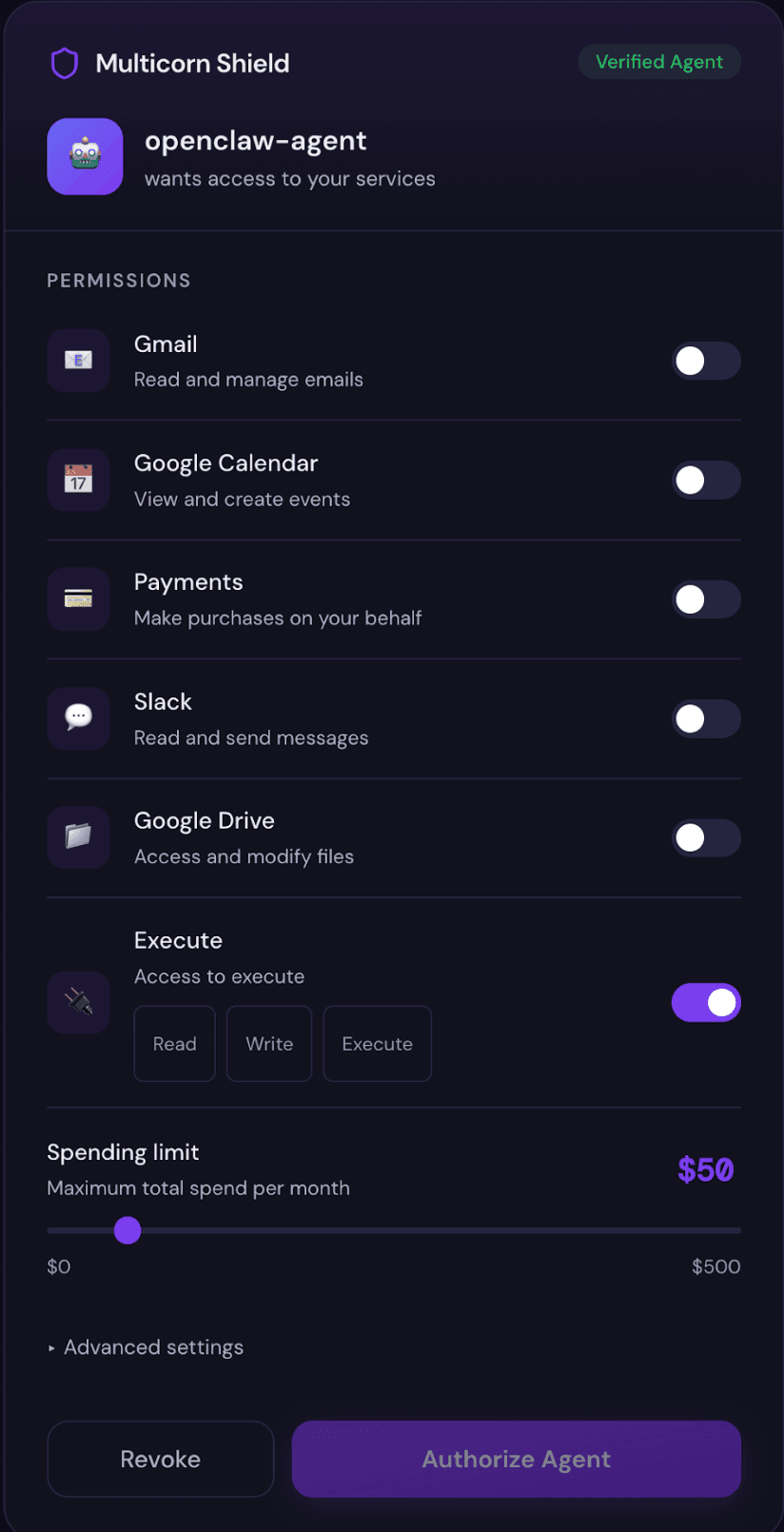
See the consent screen in action
This is how the consent screen appears to your users. They review permissions, adjust the spending limit, and approve or deny the agent.
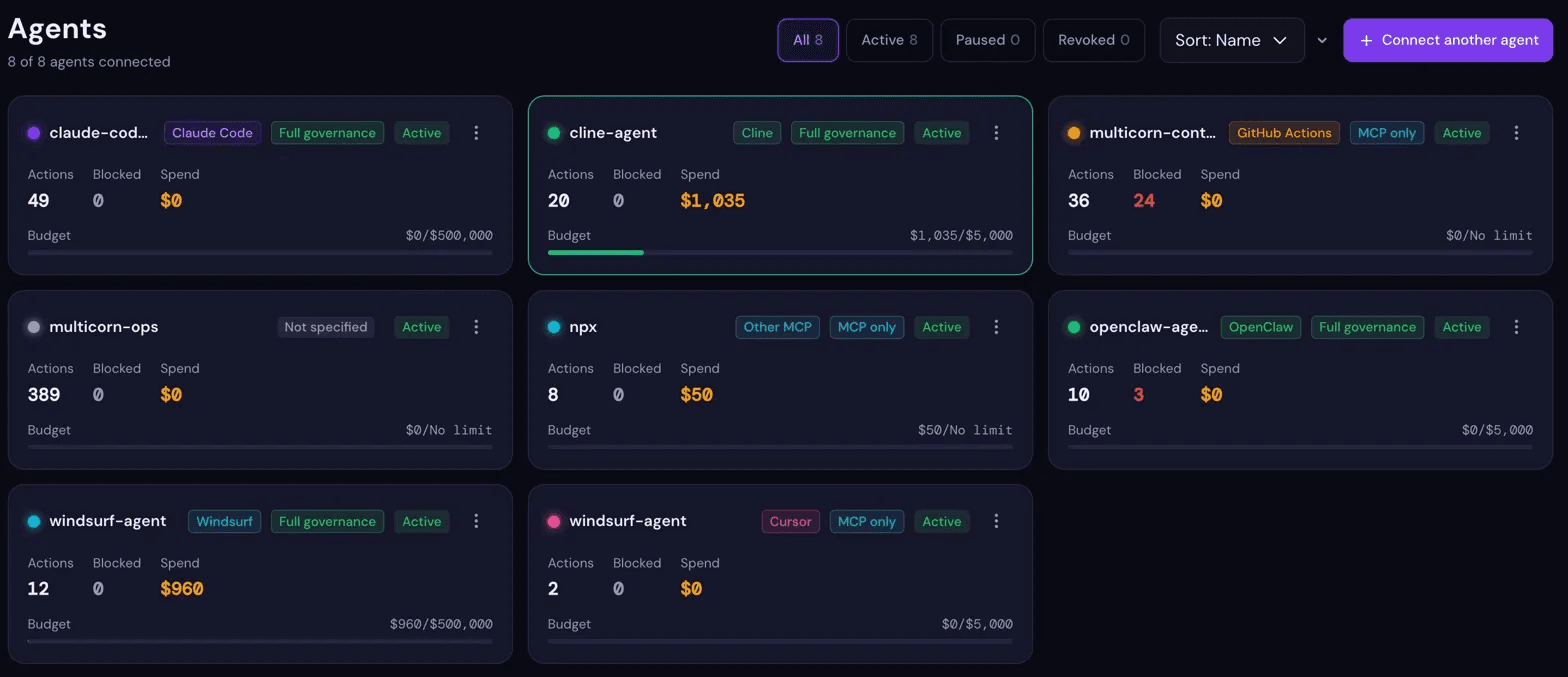
See everything your agents do
The Shield dashboard gives you a real-time view of every agent, every action, and every permission, all in one place.
See it in action
Run the proxy, make a tool call, and watch it appear in the dashboard in real time.
$ npx multicorn-shield --wrap npx @modelcontextprotocol/server-filesystem /tmp
Proxy starting agent=filesystem command=npx
Agent resolved agent=filesystem scopes=3
Proxy ready agent=filesystem
Extracted tool identity tool=filesystem_read_file service=filesystem
Scope validation result service=filesystem action=read_file allowed=true
Approved action logged service=filesystem action=read_file
Extracted tool identity tool=gmail_send_email service=gmail
Scope validation result service=gmail action=send_email allowed=false
Action blocked service=gmail reason=no execute permission
█

We Run Shield on Shield
Every production deployment of Multicorn runs through Shield. When a deploy touches authentication code, security configuration, or database migrations, Shield pauses the pipeline and sends an approval request. Outside business hours, every deploy requires approval regardless of what changed.
No code reaches production without passing through the same permission checks, audit trail, and approval flow that Shield provides to your team.
MIT licensed
Use, modify, and self-host
Open source
Code and issues on GitHub
Built in Australia
Designed by the Multicorn team
Not sure if Shield is right for you?
Different tools solve different problems. See how Shield compares to other AI agent control tools - Agent Safehouse, agentsh, and AgentGate - and find the right fit for your team.
Start controlling your AI agents today
Free to start, no credit card required. Set up consent screens and spending controls in minutes.